SVLAN
How to implement an SVLAN to capture all traffic not dealt with locally. For instance, a switch port faces a router with OSPF configured to operate in a VLAN. All other traffic on this switch port should be placed into an SVLAN which is accessible to other ports.
Worked Example
plan, seam, and wood, are all Mikrotik routers. plan and seam have
an OSPF session in VLAN 536. plan and wood have an OSPF session in VLAN
520. The VLAN 206 is present on seam and wood and should be trunked
transparently through plan. plan does not need VLAN 206 to be
configured. Similarly, seam and wood do not need knowledge of SVLAN 3091.
                    +-------------------+
                    | plan              |
                    +-------------------+
                    |    SVLAN: 3091    |
  trunk VLAN 536    |                   | trunk VLAN 520
  trunk VLAN 206    |                   | trunk VLAN 206
+-------------------+                   +-------------------+
| seam              |                   | wood              |
+-------------------+                   +-------------------+
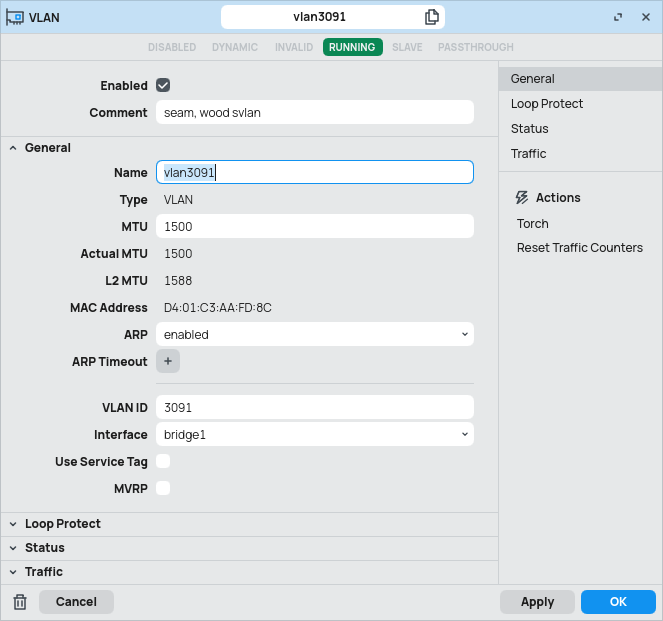
Create the SVLAN on plan. Under ‘Interfaces, VLAN’, create the new VLAN.
Name the VLAN, set the VLAN ID, and select the router’s single bridge as the
interface. Do not tick ‘Use Service Tag’.
VLANs 520 and 536 already exist on plan for the OSPF sessions with seam and
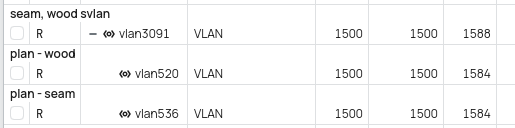
wood. Under ‘Interfaces, VLAN’, select each of the two extant VLANs 520 and
536 and change their interface to the newly created SVLAN. The VLAN list will
change to illustrate that VLANs 520 and 536 are now a part of the SVLAN 3091.
OSPF will be temporarily disrupted, as the SVLAN 3091 has not been added to a
port.
Under ‘Bridge, Ports’, identify the two ports facing seam and wood. Change
the PVID on each of these ports to the SVLAN 3091 and ensure that ‘Tag
Stacking’ is checked. As long as the physical interfaces are up, under
‘Bridge, VLANs’, it can be seen that the SVLAN 3091 has been dynamically added
to these ports by PVID.
Verify that OSPF to seam and wood has been reestablished.
Create VLAN 206 on each of seam and wood, applying it by PVID to any
desired access ports, and adding it specifically to the physical uplink to
plan under ‘Bridge, VLANs’.
Attach devices to the physical ports on each of seam and plan which are in
VLAN 206. Verify connectivity between them by setting IP addresses and pinging
across the link. Verify that the MAC addresses of the end devices appear in
the MAC address table of seam and wood in VLAN 206, and in the MAC address
table of plan in SVLAN 3091, by navigating to ‘Bridge, Hosts’ on each device.
The configuration is complete, and VLAN tagged traffic is passed transparently
through plan with no further configuration. Additional configurations now
possible are the extension of SVLAN 3091 to other devices by trunking it from
plan, and ‘plucking out’ more VLANs from the links to seam and wood, in
addition to the OSPF VLANs.